Software buyer guide · Bangladesh

WordPress and WooCommerce development in Bangladesh: buy maintainability.

Binnash planning ranges are about $1,000–$3,000 (BDT 1.5–4 lakh) for a custom publishing site, $3,000–$6,500 (BDT 4–8 lakh) for custom blocks, themes, or plugins, and $6,500–$14,500+ (BDT 8–18+ lakh) for WooCommerce or an integration-heavy build. Content structure, migration, update safety, performance, security, and operating responsibility determine the actual quote.

Start a project

By Nazmul Alam · Reviewed

01

WordPress and WooCommerce planning ranges

The tiers describe Binnash delivery ranges, not commodity page-count packages. A proposal confirms the editorial, commerce, integration, migration, and maintenance boundaries.

USD values use the Bangladesh Bank average exchange rate of BDT 123.6969 per USD for 22 July 2026 and are rounded to the nearest $500. BDT remains the pricing source of truth. Premium themes, plugins, SaaS services, hosting, CDN, email, payment fees, and other recurring costs are separate unless the proposal explicitly includes an allowance.

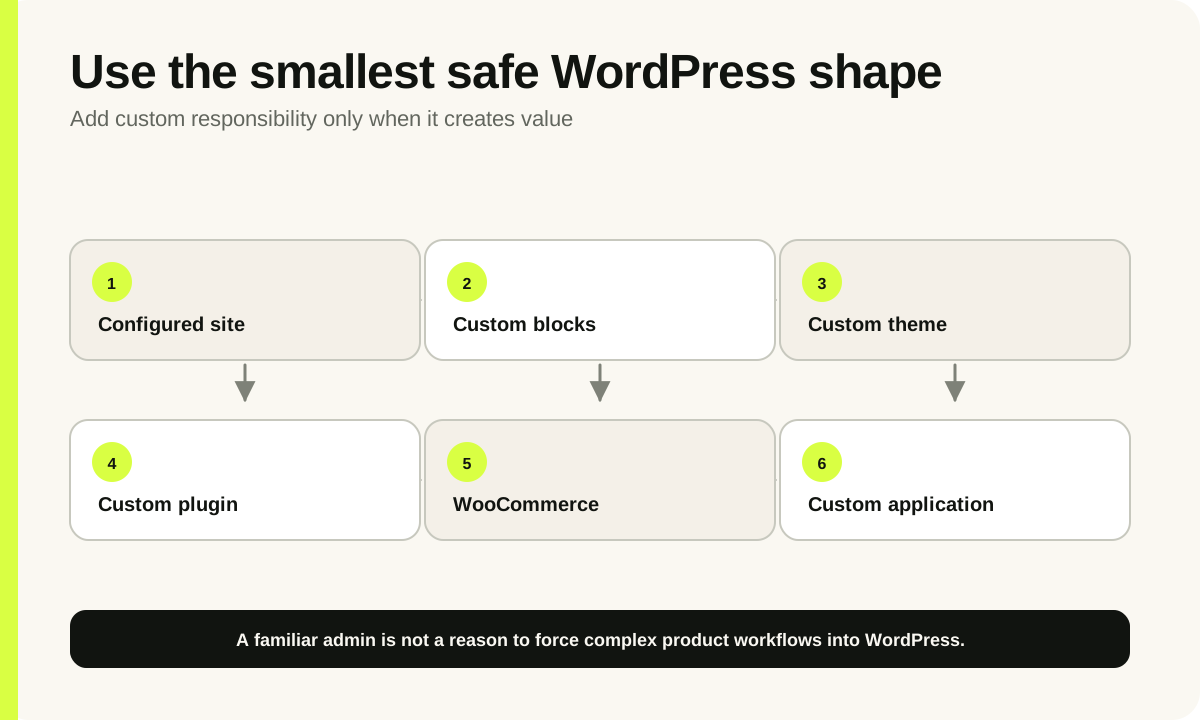
WordPress implementation ladder from configured site through custom blocks, plugins, WooCommerce, and a custom application
Use only as much custom engineering as the publishing or commerce model genuinely requires.

2–5 weeks

Custom Publishing Site

≈$1,000–$3,000

BDT 1.5–4 lakh

A focused company, campaign, publication, or marketing site with a defined content model, custom visual implementation, reusable editor patterns, and a modest migration.

Assumes

  • Approved content structure
  • Content supplied on schedule
  • Limited integrations
  • Conventional editorial roles

What moves the estimate

  • Template variety
  • Animation depth
  • Content migration
  • Multisite or multilingual needs

5–10 weeks

Custom Blocks, Themes, or Plugins

≈$3,000–$6,500

BDT 4–8 lakh

An editorial system needing tailored blocks, design controls, structured content, a bespoke theme, business integration, or a maintained plugin capability.

Assumes

  • Supported WordPress baseline
  • Defined editor experience
  • Representative existing content
  • Named integration owner

What moves the estimate

  • Editor guardrails
  • Plugin distribution
  • Compatibility matrix
  • API and permission complexity

8–16+ weeks

WooCommerce or Integration-Heavy Build

≈$6,500–$14,500+

BDT 8–18+ lakh

Content-led commerce or a WordPress platform with substantial catalogue, checkout, membership, migration, search, operational integrations, or high-traffic responsibilities.

Assumes

  • Platform fit validated
  • Prioritized extension set
  • Operational workflow documented
  • Staged launch where needed

What moves the estimate

  • Checkout changes
  • Catalogue rules
  • Legacy plugin debt
  • Performance and integration targets
Planning range summary. BDT is the commercial source of truth; USD is rounded for comparison.
Delivery tier USD planning range BDT planning range Planning window
Custom Publishing Site ≈$1,000–$3,000 BDT 1.5–4 lakh 2–5 weeks
Custom Blocks, Themes, or Plugins ≈$3,000–$6,500 BDT 4–8 lakh 5–10 weeks
WooCommerce or Integration-Heavy Build ≈$6,500–$14,500+ BDT 8–18+ lakh 8–16+ weeks

02

Configured WordPress, custom engineering, or another platform?

The useful question is not whether WordPress can technically do something. It is whether the chosen approach remains safe, understandable, and economical through updates and editorial change.

Configured WordPress can be the most responsible choice for a standard site. Avoid adding custom code merely to appear sophisticated. Select a maintained foundation, remove redundant plugins, define backups and updates, and give editors a clear content model. The build still needs accessibility, responsive behavior, performance, security, analytics, deployment, and handover.

Custom blocks and themes are valuable when editors need reusable structures without uncontrolled layout decisions. A good editor experience separates content from presentation, constrains fragile options, previews important states, and keeps output semantic. “Pixel-perfect” frontend work is incomplete if ordinary content changes break it.

Use a custom application when WordPress is being asked to become a complex multi-tenant product, transaction engine, operational workflow, or integration hub without a strong publishing reason. A familiar admin interface is not enough to justify a brittle architecture.

The WordPress and WooCommerce engineering service covers implementation. Compare commerce-heavy requirements with the ecommerce development guide , and use the general software cost guide if WordPress is only one layer in a larger application.

WordPress implementation approaches
Approach Best fit Primary responsibility
Configured WordPress Conventional publishing using a restrained set of reputable capabilities Control plugins, configuration, content structure, updates, and hosting
Custom blocks and theme A differentiated design with reusable editor controls and predictable frontend output Maintain block contracts, editor experience, templates, styles, accessibility, and compatibility
Custom plugin A bounded business capability or integration that belongs inside WordPress Secure permissions and data, version behavior, test updates, document ownership, and support consumers
WooCommerce Content-led commerce whose catalogue and operation fit the platform Govern extensions, checkout, payments, inventory, performance, and merchant operations
Custom application Complex product workflows, transactions, tenancy, or operations exceed a safe WordPress model Fund complete product engineering and operations instead of accumulating plugin workarounds

03

Content architecture and editorial workflow

Page count does not describe a publishing system. The estimate should begin with content types, relationships, templates, governance, and the people doing the work.

Migration cost depends on the inconsistency of the source. Export access, embedded page-builder markup, missing media, duplicate taxonomies, broken internal links, historic URLs, and inconsistent formatting all require decisions. Automate repeatable transformations, then reserve human review for ambiguous content. Agree redirects and reconciliation before launch.

A design system should include real editorial extremes: long titles, absent images, several authors, nested navigation, large tables, old content, and unexpected embeds. Testing only polished sample pages transfers layout failures to the publishing team after handover.

Content model

  • Content types, fields, taxonomies, and relationships
  • Reusable blocks and allowed combinations
  • Archive, search, filter, and detail templates
  • Media sizes, focal points, captions, and alternatives
  • URLs, redirects, metadata, and structured data
  • Migration mapping and invalid-content policy

Editorial workflow

  • Author, editor, publisher, and administrator roles
  • Draft, review, preview, scheduling, and revision needs
  • Reusable patterns versus locked layouts
  • Required validation and safe defaults
  • Training, documentation, and content ownership
  • Translation or multisite governance where applicable

04

Update safety and plugin compatibility

WordPress core, themes, plugins, PHP, databases, and hosting services change independently. Maintainability comes from controlling how those changes reach production.

Use the smallest defensible extension set and record why each dependency exists, who maintains it, its license, data ownership, update history, and replacement path. Overlapping page builders, optimization plugins, security products, analytics tools, and snippets make behavior harder to reason about and increase the compatibility surface.

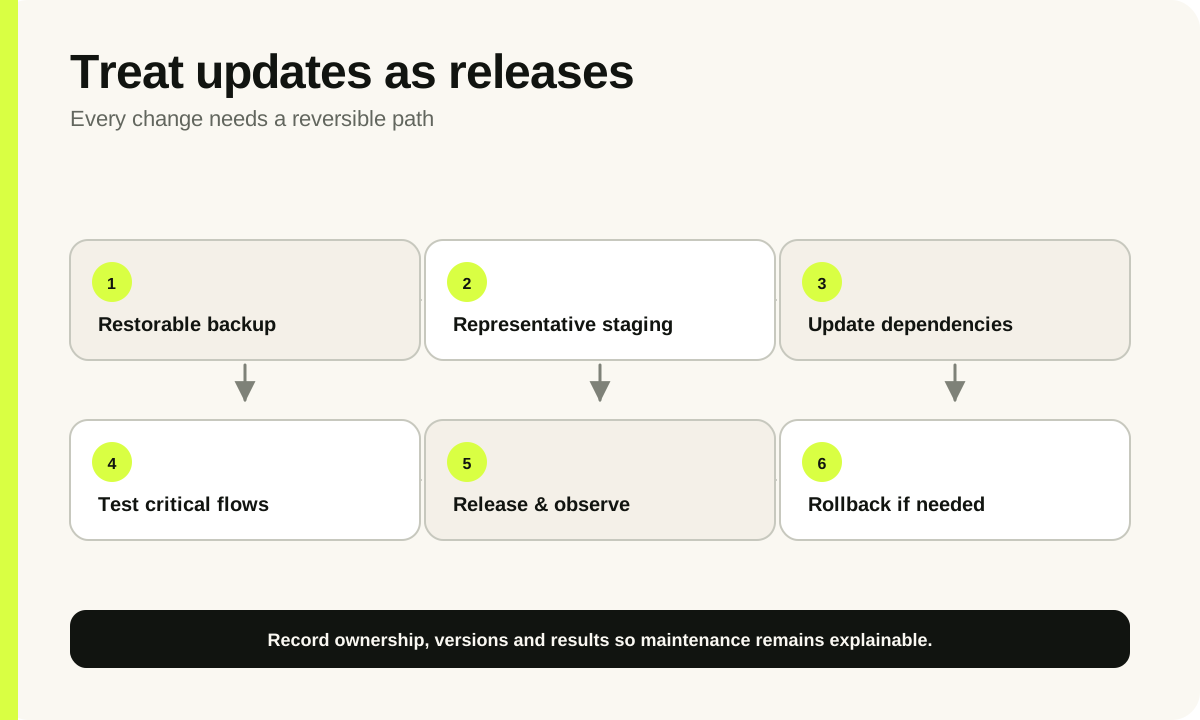
A safe update process has backups that are actually restorable, a staging environment representative of production, a dependency review, automated or documented checks for critical workflows, deployment records, monitoring, and a rollback path. Automatic updates may be suitable for some low-risk components, but they do not remove the need to observe results.

When the site is operated from Bangladesh, confirm who controls the domain, DNS, hosting, CDN, email, licenses, backups, and payment accounts, including the billing currency and renewal owner. Local access does not compensate for a weak recovery process; administrators still need protected accounts, least privilege, tested restores, and an off-site copy appropriate to the risk.

Custom work should use documented WordPress APIs and avoid modifying core or vendor files. Compatibility scope must be realistic: supported WordPress and PHP versions, browsers, editor behavior, WooCommerce versions if relevant, and any named plugins. “Works with everything” is not a testable promise.

Safe WordPress update loop covering backup, staging, dependency updates, automated checks, editorial review, release, monitoring, and rollback
Safe maintenance treats every update as a reversible release.

05

Security and permissions

WordPress security is an application and operations discipline, not a plugin badge. Code, configuration, accounts, hosting, dependencies, and response ownership all matter.

Custom code should validate and sanitize input, escape output in the correct context, verify nonces where appropriate, enforce capabilities for every sensitive action, use safe database APIs, protect uploads, and avoid exposing secrets. A nonce helps protect request intent; it is not authorization. Every action still needs a capability decision.

Operational controls include least-privilege accounts, strong authentication, controlled administrator access, prompt updates, secure secrets, backups, logs, malware and integrity response, and deletion of unused themes and plugins. The proposal should identify which controls Binnash configures and which remain with the hosting provider or site owner.

WooCommerce and membership sites hold more sensitive customer and transactional data. Scope retention, exports, deletion, staff visibility, payment-provider boundaries, audit needs, and incident contacts. Independent compliance, penetration testing, legal review, and certification are separate specialist services when required.

06

Performance and accessibility

WordPress performance is affected by theme output, database queries, plugins, images, fonts, third-party scripts, caching, CDN, hosting, and traffic shape. Buying a faster server does not fix every layer.

Set budgets using representative pages rather than a single homepage score. Test mobile navigation, forms, search, archives, articles, product listings, product detail, cart, and checkout where relevant. Core Web Vitals are useful targets, while accessibility also requires keyboard, focus, labels, landmarks, contrast, zoom, error messaging, and content practices.

Performance responsibilities by layer
Layer Engineering focus Operational dependency
Frontend Semantic templates, responsive images, CSS and JavaScript discipline, stable layout Editor media choices and third-party scripts
WordPress application Efficient queries, cache use, bounded plugins, scheduled work, object lifecycle Update process and content volume
Infrastructure Page caching compatibility, CDN rules, asset headers, environment configuration Hosting capacity, database, storage, regions, and provider support
Measurement Representative templates, lab checks, analytics, error visibility Real-user traffic, devices, consent, and monitoring retention

07

WooCommerce and integration scope

WooCommerce adds a commerce lifecycle to the publishing platform. Catalogue, promotions, tax, checkout, payments, orders, inventory, fulfilment, refunds, and customer service should be scoped as workflows.

Confirm products, variants, bundles, subscriptions, memberships, price rules, stock sources, shipping zones, pickup, payment methods, guest checkout, invoices, refunds, and customer communication. Every extension that changes these flows adds a contract that must survive updates and interact correctly with the others.

For ERP, CRM, payment, courier, marketplace, or warehouse integrations, define the system of record, identifiers, direction, timing, webhooks, retries, duplicate handling, rate limits, reconciliation, alerts, and manual recovery. A connector’s existence does not prove that it supports the merchant’s actual states and exceptions.

Gateway fees, platform or extension subscriptions, email and messaging, tax services, search, hosting, CDN, content production, photography, and fulfilment are not engineering fees. Model them beside the build so the first-year operating cost is visible.
08

Inclusions, handover, and maintenance

Binnash proposals state what will be built, how it will be accepted, and who owns the site after launch.

Handover can include source code and repository access, environment and deployment notes, dependency inventory, license ownership, administrator access, backup and restore guidance, analytics ownership, editor training, and known limitations. Client-owned provider accounts reduce lock-in and make future transfer more practical.

The included 90 days cover correction of defects against the accepted scope and launch stabilization. WordPress core, plugin, browser, provider, or policy changes after acceptance are maintenance rather than automatically defects. Continuing updates, security response, uptime monitoring, content help, backups, and roadmap delivery need a separate maintenance or monthly product agreement.

Defined builds use scoped milestone pricing. Binnash can also provide monthly product-engineering work without a public rate because the required disciplines and response obligations vary. Either model should preserve a prioritized backlog, documented decisions, staging, release evidence, and ownership visibility.

Included baseline

  • Discovery and written scope
  • Necessary product UX and interface design
  • Engineering and scope-appropriate automated testing
  • Production deployment, documentation, and handover
  • 90 days of defect correction and launch stabilization

Usually separate

  • Applicable taxes and premium licenses
  • Hosting, CDN, email, search, gateway, or SaaS charges
  • Brand strategy, copywriting, photography, and bulk content entry
  • Unlisted cleanup, migration, translation, or integration work
  • Independent security or compliance assessment
  • New features and ongoing maintenance after launch

Sources

Authoritative references

External facts and conversion guidance should be checked against these primary sources at decision time.

FAQ

Useful questions, answered directly.

How much does WordPress development cost at Binnash?

Indicative ranges are $1,000–$3,000 (BDT 1.5–4 lakh) for a custom publishing site, $3,000–$6,500 (BDT 4–8 lakh) for custom blocks, themes, or plugins, and $6,500–$14,500+ (BDT 8–18+ lakh) for WooCommerce or an integration-heavy build.

Are premium plugin and theme licenses included?

No, unless the proposal names a specific allowance. Premium extensions, themes, fonts, hosting, CDN, email, search, gateways, and other services remain client-owned recurring costs. The dependency inventory should identify licenses and renewal responsibility.

When is a custom WordPress theme worthwhile?

A custom theme is worthwhile when the site needs a distinct design system, semantic templates, predictable performance, accessible behavior, and reusable editor controls that a configured theme cannot provide cleanly. Conventional sites may be better served by a restrained maintained foundation.

Can Binnash build a custom WordPress plugin?

Yes. Scope should define data, permissions, settings, integrations, installation, upgrades, compatibility, tests, documentation, and distribution. A plugin used across many or public sites needs a larger support and compatibility plan than an internal site capability.

Does Binnash migrate existing WordPress content?

Yes when source access, content mappings, page-builder cleanup, media, users, taxonomies, metadata, URLs, redirects, reconciliation, and human-review ownership are agreed. A representative sample is used to expose inconsistent legacy content before the final estimate.

How are WordPress updates handled after launch?

The build includes the accepted release and 90 days of defect correction and stabilization. Continuing core, plugin, theme, PHP, and infrastructure updates require owner responsibility or a separate maintenance agreement with staging, backups, checks, monitoring, and rollback.

When should WooCommerce be replaced by a custom application?

Consider a custom application when complex tenancy, transactions, operations, integration orchestration, or product workflows require persistent workarounds and a large fragile extension set. Keep WooCommerce when content-led commerce fits its model and the extension surface can be governed safely.

Start with context

Have a product decision to make?

Share the current stage, constraint, timeline, and approved budget band. The senior team will reply with the right next step.

Send a project brief